Overview
I previously installed Windows 11 25H2 on a PC that is officially unsupported.
In this article, I will demonstrate how to update the Secure Boot certificates on that same PC after installing the December 2024 (or later) quality updates. Since these update programs have been distributed since the Windows 10 era, I knew it would be possible to perform this task.
Why Update?
The reason for this update is that the current Secure Boot certificates are set to expire in June or October 2026. While your PC will continue to function after the expiration, it compromises Windows Boot security.
An expired certificate leaves the system vulnerable to risks such as "BlackLotus," where malicious programs are injected into the boot sequence. These types of attacks are difficult for OS-level security software to prevent. This is particularly concerning for business environments; however, since most businesses likely do not use such old hardware, I am testing this as a hobbyist project.
The necessary updates for certificates should be included starting from KB5034765 (February 2024).
Related Official Resources:
- KB5036210: Deploying Windows UEFI CA 2023 Certificate to the Secure Boot Allowed Signature Database (DB)
- December 9, 2025 — KB5072033 (OS Builds 26200.7462 and 26100.7462)
Process Summary:
- Check current certificate status.
- Add Registry keys.
- Run the scheduled task.
- Restart the PC.
- Verify the updated status.
ad
Environment Specs
The following PC was used for this validation. Please note that this device is technically unsupported for Windows 11, and this procedure is outside of the manufacturer's official support scope.
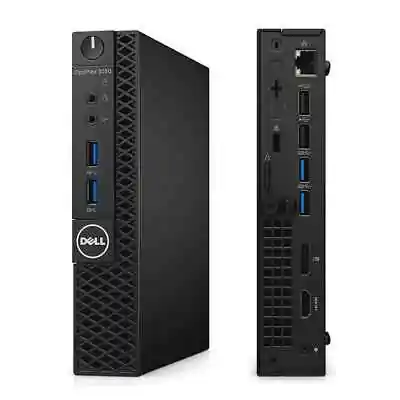
- Model: Dell OptiPlex 3050 Micro (Released around 2017)
- CPU: Intel Core i5-6500T
- RAM: 8GB
- OS: Windows 11 Pro 25H2 (Force-installed)
- BIOS Version: 1.32.0 (Latest available as of Dec 2025)
Note: Initially, the 2023 certificate was not active. I reset the BIOS to a state where "Only 2011 Certificate is Active / 2023 Certificate is Inactive" before starting this guide to match the most common user scenario.
Step-by-Step Instructions
1. Check Certificate Status
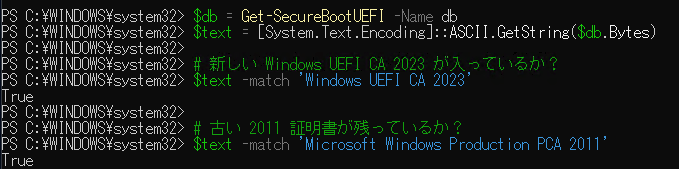
Open PowerShell and run the following commands to check if the 2023 certificate is present.
PowerShell
# Get the DB (Allowed Signature Database) and convert to ASCII string
$db = Get-SecureBootUEFI -Name db
$text = [System.Text.Encoding]::ASCII.GetString($db.Bytes)

# Check if the new Windows UEFI CA 2023 is present
$text -match 'Windows UEFI CA 2023'

# Check if the old 2011 certificate is present
$text -match 'Microsoft Windows Production PCA 2011'
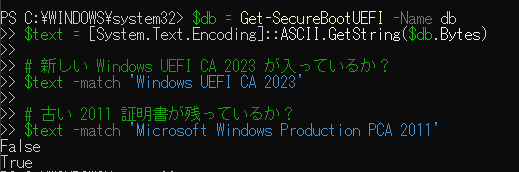
Results: In my case, the result for the 2011 certificate was True, but the 2023 certificate was False.
To check the status in more detail, run:
PowerShell
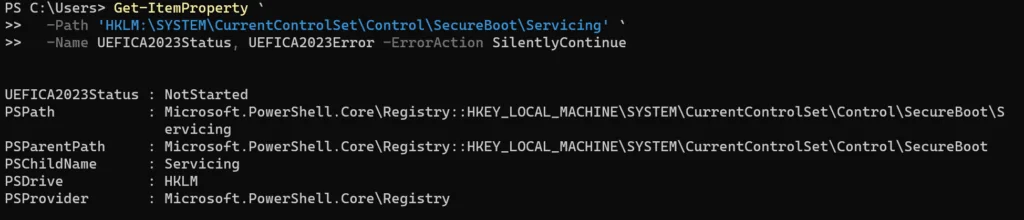
Get-ItemProperty -Path 'HKLM:\SYSTEM\CurrentControlSet\Control\SecureBoot\Servicing' -Name UEFICA2023Status, UEFICA2023Error -ErrorAction SilentlyContinue
This confirmed that the required service had not yet started.
2. Add Registry Key
Since the PC is fully updated via Windows Update and Secure Boot is enabled in the BIOS, we can now enable the Windows UEFI CA 2023 certificate via the Registry.
Run the following command in PowerShell:
PowerShell
reg add HKEY_LOCAL_MACHINE\SYSTEM\CurrentControlSet\Control\Secureboot /v AvailableUpdates /t REG_DWORD /d 0x5944 /f
3. Execute the Update Service
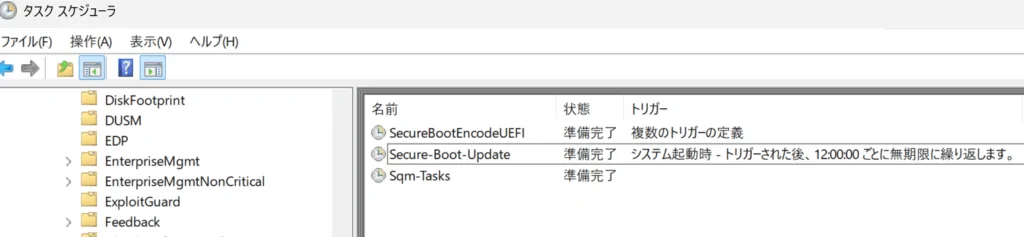
While there is a Secure Boot update task in the Task Scheduler, it's faster to trigger it via PowerShell:
PowerShell
Start-ScheduledTask -TaskName "\Microsoft\Windows\PI\Secure-Boot-Update"
4. Restart PC
Restart Windows to apply the changes.
5. Verify the Certificate Status
Run the status check command from Step 1 again. The result for Windows UEFI CA 2023 should now be True.
Supplementary Information
For this specific model, I updated the BIOS to the latest version beforehand. If you are using a device that officially meets the Windows 11 requirements, most manufacturers have provided specific guidance regarding the Secure Boot certificate expiration. Please check your manufacturer’s support page:
- VAIO: Updating the Secure Boot Certificate Database.
- Dell: Microsoft 2011 Secure Boot Certificate Expiration.
- HP: HP Commercial PCs - Preparing for the New Windows Secure Boot Certificate.
- Lenovo: About the 2011 Microsoft Secure Boot Certificate Expiration.
ad