ad

table of contents
- Completed image
- Windows (CUDA / CPU) & Mac Apple Silicon
- ⛔ Important Notice — Please Read Before Proceeding
- What is Qwen3-TTS?
- Prerequisites (All Platforms)
- Setup Guide by Environment
- Python FIle
- Launching the Streamlit GUI
- How to Clone a Voice
- Troubleshooting
- Summary
- References
Completed image
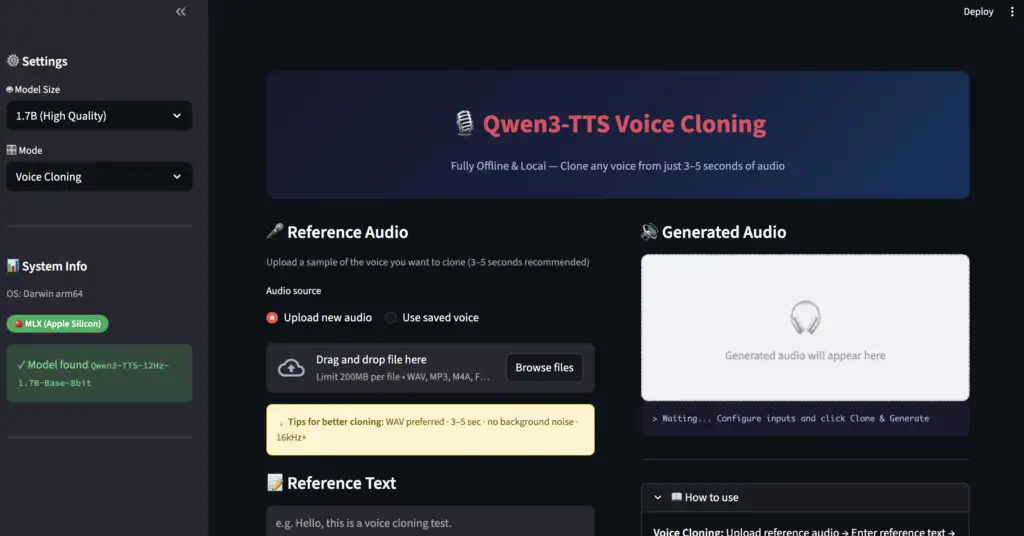
Windows (CUDA / CPU) & Mac Apple Silicon
⛔ Important Notice — Please Read Before Proceeding
Voice cloning is an extremely powerful technology that, if misused, can seriously violate the rights of others.
Before following any steps in this article, please read and agree to the following terms.✅ Permitted Use
- Cloning and generating your own voice
- Using voices for which you have obtained explicit written consent from the speaker
- Personal research or learning purposes where output is not published or distributed
❌ What You Must Never Do
- Cloning or generating someone else’s voice without their permission
- Using the voice of public figures, celebrities, voice actors, or broadcasters without authorization
- Using generated audio to impersonate another person (constitutes fraud / identity theft)
- Using generated audio commercially without permission
- Creating or spreading deepfake audio
⚖️ Legal Risks
Cloning another person’s voice without consent may violate laws including:
- Copyright law — Voice actors, performers, and narrators may hold neighboring rights over their voices
- Right of publicity / Unfair competition law — Unauthorized commercial use of a public figure’s voice, name, or likeness can be illegal
- Criminal law (fraud, defamation, etc.) — Using generated audio for impersonation or disinformation may constitute a criminal offense
- Privacy law — Collecting and processing someone’s voice data without consent may violate personal data protection regulations
Running this tool locally does not make unauthorized use legal. The moment you use or share generated audio, legal liability may arise.
📌 Assumption of This Article
This article is written on the premise that you will only use your own voice or audio for which you have obtained appropriate permission. If you do not understand or agree with the above, please do not follow the steps in this article. All responsibility for how you use this technology rests solely with you.
This guide walks you through running Qwen3-TTS — an open-source TTS model developed by Alibaba Cloud — fully offline on your own PC or Mac. With just 3–5 seconds of sample audio, anyone can clone a voice locally.
Who this guide is for:
- Windows users with a CUDA-capable GPU
- Windows users with CPU only (no GPU)
- Mac users on Apple Silicon (M1/M2/M3/M4)
⚠️ Intel Mac is not covered in this guide. The MLX framework used here is Apple Silicon-only, and the setup differs significantly.
What is Qwen3-TTS?
Qwen3-TTS is an open-source text-to-speech model released in February 2026 by the Qwen team at Alibaba Cloud.
Key features:
- Voice cloning: Clone any voice from just 3–5 seconds of audio
- 10 languages: Japanese, English, Chinese, Korean, German, French, Russian, Portuguese, Spanish, Italian
- Fully offline: No internet required after the initial model download
- Model sizes: 1.7B (high quality) / 0.6B (lightweight, faster)
- Streamlit GUI: Browser-based UI for easy use
Prerequisites (All Platforms)
Python Version
Python 3.11 is recommended.
| Version | Status |
|---|---|
| 3.10 | ○ Works |
| 3.11 | ◎ Recommended |
| 3.12 | ○ Works |
| 3.13 | △ Some packages may have issues |
Installing ffmpeg
ffmpeg is required for audio format conversion.
Windows:
# Using Chocolatey
choco install ffmpeg

# Using winget
winget install ffmpeg
Mac (arm64 Homebrew):
/opt/homebrew/bin/brew install ffmpegSetup Guide by Environment
🖥️ Windows — CUDA GPU
Requirements
- NVIDIA GPU (8GB+ VRAM recommended)
- CUDA Toolkit 12.x installed
- Python 3.11
Steps
① Create a virtual environment
Create a virtual environment with Python 3.11.
mkdir qwen3-tts
cd qwen3-tts
py -3.11 -m venv .venv
.venv\Scripts\activate
pip install --upgrade pip
② Install PyTorch with CUDA
# For CUDA 12.1
pip install torch torchaudio --index-url https://download.pytorch.org/whl/cu121

# For CUDA 12.4
pip install torch torchaudio --index-url https://download.pytorch.org/whl/cu124
Check your CUDA version by running
nvidia-smi.
③ Install Qwen3-TTS and GUI libraries
pip install qwen-tts streamlit soundfile huggingface_hub④ Download the voice cloning model
python -c "
from huggingface_hub import snapshot_download
snapshot_download(
    repo_id='Qwen/Qwen3-TTS-12Hz-1.7B-Base',
    local_dir='./models/Qwen3-TTS-12Hz-1.7B-Base'
)
print('Done')
"
🖥️ Windows — CPU Only
This works without a GPU, but generation may take several minutes per request. Start with short texts.
① Create a virtual environment
Create a virtual environment with Python 3.11.
mkdir qwen3-tts
cd qwen3-tts
py -3.11 -m venv .venv
.venv\Scripts\activate
pip install --upgrade pip
② Install PyTorch (CPU)
pip install torch torchaudio③ Install Qwen3-TTS and GUI libraries
pip install qwen-tts streamlit soundfile huggingface_hub④ Download the model
python -c "
from huggingface_hub import snapshot_download
snapshot_download(
    repo_id='Qwen/Qwen3-TTS-12Hz-1.7B-Base',
    local_dir='./models/Qwen3-TTS-12Hz-1.7B-Base'
)
print('Done')
"
💡 On CPU, the 0.6B lightweight model is more practical:
repo_id='Qwen/Qwen3-TTS-12Hz-0.6B-Base'
🍎 Mac Apple Silicon (M1/M2/M3/M4)
The Mac version uses Apple’s MLX framework instead of PyTorch, which is optimized for Apple Silicon and runs significantly faster.
Requirements
- Apple Silicon Mac (M1/M2/M3/M4)
- macOS Ventura 13.0 or later
- 16GB RAM recommended (for the 1.7B model)
Steps
① Install the arm64 version of Homebrew
⚠️ If Homebrew is installed at
/usr/local, that is the Intel version. Run the command below to install the arm64 version alongside it.
arch -arm64 /bin/bash -c "$(curl -fsSL https://raw.githubusercontent.com/Homebrew/install/HEAD/install.sh)"② Install arm64 Python 3.11 and ffmpeg
/opt/homebrew/bin/brew install python@3.11 ffmpegVerify the installed Python is arm64:
/opt/homebrew/bin/python3.11 -c "import platform; print(platform.machine())"
# → Should print: arm64
③ Clone the MLX repository and set up the virtual environment
git clone https://github.com/kapi2800/qwen3-tts-apple-silicon.git
cd qwen3-tts-apple-silicon

# Create the virtual environment using arm64 Python
/opt/homebrew/bin/python3.11 -m venv .venv
source .venv/bin/activate

# Confirm arm64
python3 -c "import platform; print(platform.machine())"
# → Should print: arm64
④ Install dependencies
pip install --upgrade pip

# Python 3.11 has audioop built-in, so exclude audioop-lts
grep -v 'audioop-lts' requirements.txt > requirements_fixed.txt
pip install -r requirements_fixed.txt && rm requirements_fixed.txt

# Install the MLX audio library and GUI
pip install mlx-audio streamlit soundfile
⑤ Download the voice cloning model
python -c "
from huggingface_hub import snapshot_download
snapshot_download(
    repo_id='Qwen/Qwen3-TTS-12Hz-1.7B-Base',
    local_dir='./models/Qwen3-TTS-12Hz-1.7B-Base-8bit'
)
print('Done')
"
💡 On Mac (MLX version), model folder names end with
-8bit.
ad
Python FIle
Create app.py in the folder and copy and paste the code
"""
Qwen3-TTS Voice Cloning - Local GUI App
Streamlit | Multi-Platform Support

Supported environments:
  - Mac Apple Silicon (M1/M2/M3/M4) : mlx_audio backend
  - Windows CUDA                     : qwen_tts + PyTorch CUDA backend
  - Windows CPU                      : qwen_tts + PyTorch CPU backend

How to launch:
    source .venv/bin/activate   # Mac
    .venv\\Scripts\\activate     # Windows
    streamlit run app_en.py
"""

import streamlit as st
import os, sys, shutil, tempfile, time, wave, re, subprocess, platform
from pathlib import Path
from datetime import datetime

# ========== Page Config ==========
st.set_page_config(
    page_title="Qwen3-TTS Voice Cloning",
    page_icon="🎙️",
    layout="wide",
    initial_sidebar_state="expanded",
)

st.markdown("""
<style>
.main-header{background:linear-gradient(135deg,#1a1a2e,#16213e,#0f3460);
 padding:2rem;border-radius:12px;margin-bottom:1.5rem;text-align:center}
.main-header h1{color:#e94560;font-size:2.2rem;margin:0;font-weight:700}
.main-header p{color:#a8b2d8;margin:.5rem 0 0;font-size:1rem}
.stButton>button{background:linear-gradient(135deg,#e94560,#c23152);color:white;
 border:none;border-radius:8px;padding:.7rem 2rem;font-size:1rem;font-weight:600;width:100%}
.stButton>button:hover{background:linear-gradient(135deg,#c23152,#a01f3f);
 transform:translateY(-1px);box-shadow:0 4px 12px rgba(233,69,96,.3)}
.status-bar{background:#1a1a2e;color:#a8b2d8;padding:.8rem 1rem;border-radius:8px;
 font-family:monospace;font-size:.85rem;min-height:3rem}
.hint-box{background:#fff3cd;border:1px solid #ffc107;border-radius:8px;
 padding:.8rem;font-size:.85rem;color:#856404}
.env-badge{display:inline-block;padding:2px 10px;border-radius:12px;
 font-size:.8rem;font-weight:600;color:white}
</style>
""", unsafe_allow_html=True)

st.markdown("""
<div class="main-header">
    <h1>🎙️ Qwen3-TTS Voice Cloning</h1>
    <p>Fully Offline & Local — Clone any voice from just 3–5 seconds of audio</p>
</div>
""", unsafe_allow_html=True)

# ========== Backend Detection ==========
@st.cache_resource
def detect_backend():
    """Auto-detect the available backend"""
    # 1. Mac MLX (Apple Silicon)
    try:
        from mlx_audio.tts.utils import load_model      # noqa
        from mlx_audio.tts.generate import generate_audio  # noqa
        return "mlx"
    except ImportError:
        pass
    # 2. PyTorch (Windows CUDA / CPU)
    try:
        import torch
        from qwen_tts import Qwen3TTSModel  # noqa
        if torch.cuda.is_available():
            return "cuda"
        return "cpu"
    except ImportError:
        pass
    return None

BACKEND = detect_backend()

# ========== Path Configuration ==========
IS_MAC  = platform.system() == "Darwin"
IS_WIN  = platform.system() == "Windows"

if IS_MAC:
    INSTALL_DIR = Path.home() / "qwen3-tts-apple-silicon"
    MODELS_DIR  = INSTALL_DIR / "models"
    VOICES_DIR  = INSTALL_DIR / "voices"
    OUTPUT_DIR  = INSTALL_DIR / "outputs"
    SAMPLE_RATE = 24000
    # MLX models use the -8bit suffix
    MODEL_SUFFIX = "-8bit"
else:
    # Windows: models/ folder sits next to app_en.py
    INSTALL_DIR = Path(__file__).parent
    MODELS_DIR  = INSTALL_DIR / "models"
    VOICES_DIR  = INSTALL_DIR / "voices"
    OUTPUT_DIR  = INSTALL_DIR / "outputs"
    SAMPLE_RATE = 24000
    MODEL_SUFFIX = ""   # Official models use the folder name as-is

MODEL_FOLDERS = {
    ("1.7B", "Voice Cloning"):  f"Qwen3-TTS-12Hz-1.7B-Base{MODEL_SUFFIX}",
    ("1.7B", "Custom Voice"):   f"Qwen3-TTS-12Hz-1.7B-CustomVoice{MODEL_SUFFIX}",
    ("1.7B", "Voice Design"):   f"Qwen3-TTS-12Hz-1.7B-VoiceDesign{MODEL_SUFFIX}",
    ("0.6B", "Voice Cloning"):  f"Qwen3-TTS-12Hz-0.6B-Base{MODEL_SUFFIX}",
    ("0.6B", "Custom Voice"):   f"Qwen3-TTS-12Hz-0.6B-CustomVoice{MODEL_SUFFIX}",
    ("0.6B", "Voice Design"):   f"Qwen3-TTS-12Hz-0.6B-VoiceDesign{MODEL_SUFFIX}",
}

# ========== Utilities ==========
def get_model_path(folder_name: str):
    """Resolves model path, supporting HuggingFace snapshots directory structure"""
    p = MODELS_DIR / folder_name
    if not p.exists():
        return None
    snap = p / "snapshots"
    if snap.exists():
        subs = [f for f in snap.iterdir() if not f.name.startswith(".")]
        if subs:
            return str(subs[0])
    return str(p)

def convert_to_wav(src: str) -> str | None:
    if not os.path.exists(src):
        return None
    _, ext = os.path.splitext(src)
    if ext.lower() == ".wav":
        try:
            with wave.open(src, "rb") as f:
                if f.getnchannels() > 0:
                    return src
        except wave.Error:
            pass
    out = str(INSTALL_DIR / f"tmp_conv_{int(time.time())}.wav")
    cmd = ["ffmpeg", "-y", "-v", "error", "-i", src,
           "-ar", str(SAMPLE_RATE), "-ac", "1", "-c:a", "pcm_s16le", out]
    try:
        subprocess.run(cmd, check=True, stdout=subprocess.DEVNULL, stderr=subprocess.PIPE)
        return out
    except (subprocess.CalledProcessError, FileNotFoundError):
        return None

def get_saved_voices():
    if not VOICES_DIR.exists():
        return []
    return sorted([f.stem for f in VOICES_DIR.glob("*.wav")])

# ========== Sidebar ==========
with st.sidebar:
    st.markdown("### ⚙️ Settings")

    model_size  = st.selectbox("🤖 Model Size", ["1.7B (High Quality)", "0.6B (Lightweight)"])
    size_key    = "1.7B" if "1.7B" in model_size else "0.6B"
    mode_label  = st.selectbox("🎛️ Mode", [
        "Voice Cloning",
        "Custom Voice",
        "Voice Design",
    ])
    mode_short  = mode_label

    st.markdown("---")
    st.markdown("### 📊 System Info")
    st.caption(f"OS: {platform.system()} {platform.machine()}")

    backend_labels = {
        "mlx":  ("🍎 MLX (Apple Silicon)", "#27ae60"),
        "cuda": ("⚡ PyTorch CUDA",         "#2980b9"),
        "cpu":  ("🖥️ PyTorch CPU",          "#e67e22"),
        None:   ("❌ No backend found",      "#e74c3c"),
    }
    label, color = backend_labels[BACKEND]
    st.markdown(f'<span class="env-badge" style="background:{color}">{label}</span>',
                unsafe_allow_html=True)
    if BACKEND is None:
        st.error("No backend installed.")
        if IS_MAC:
            st.code("pip install mlx-audio", language="bash")
        else:
            st.code("pip install qwen-tts\npip install torch", language="bash")

    current_folder = MODEL_FOLDERS.get((size_key, mode_short), "")
    current_model  = get_model_path(current_folder)
    if current_model:
        st.success(f"✓ Model found\n`{current_folder}`")
    else:
        st.warning(f"⚠ Model not found\n`{current_folder}`")
        with st.expander("How to download"):
            hf_name = current_folder.replace("-8bit", "").replace(
                "Qwen3-TTS-12Hz-", "Qwen/Qwen3-TTS-12Hz-")
            st.code(
                f"huggingface-cli download {hf_name} \\\n"
                f"  --local-dir ./models/{current_folder}",
                language="bash",
            )

    st.markdown("---")
    if IS_WIN and BACKEND == "cpu":
        st.warning("⚠ CPU mode: generation may take several minutes")
    elif IS_WIN and BACKEND == "cuda":
        try:
            import torch
            st.caption(f"CUDA: {torch.version.cuda}")
            st.caption(f"GPU: {torch.cuda.get_device_name(0)}")
        except Exception:
            pass

# ========== Main Layout ==========
col_left, col_right = st.columns([1, 1], gap="large")

# ============================
# Left Column: Inputs
# ============================
with col_left:

    if mode_label == "Voice Cloning":
        st.markdown("#### 🎤 Reference Audio")
        st.caption("Upload a sample of the voice you want to clone (3–5 seconds recommended)")

        clone_src = st.radio("Audio source",
                             ["Upload new audio", "Use saved voice"], horizontal=True)

        ref_audio_path = None
        ref_text_val   = ""

        if clone_src == "Upload new audio":
            uploaded = st.file_uploader("Reference audio", type=["wav","mp3","m4a","flac"],
                                        label_visibility="collapsed")
            if uploaded:
                st.audio(uploaded)
                suffix = Path(uploaded.name).suffix
                tmp = tempfile.NamedTemporaryFile(delete=False, suffix=suffix,
                                                  dir=str(INSTALL_DIR))
                tmp.write(uploaded.read())
                tmp.close()
                ref_audio_path = tmp.name
                st.success(f"✓ Uploaded: {uploaded.name}")
            else:
                st.markdown("""
                <div class="hint-box">
                💡 <b>Tips for better cloning:</b> WAV preferred · 3–5 sec · no background noise · 16kHz+
                </div>
                """, unsafe_allow_html=True)
        else:
            saved = get_saved_voices()
            if saved:
                sel = st.selectbox("Saved voices", saved)
                ref_audio_path = str(VOICES_DIR / f"{sel}.wav")
                txt = VOICES_DIR / f"{sel}.txt"
                if txt.exists():
                    ref_text_val = txt.read_text(encoding="utf-8").strip()
                st.audio(ref_audio_path)
            else:
                st.info("No saved voices found. Upload a new one first.")

        st.markdown("")
        st.markdown("#### 📝 Reference Text")
        ref_text_val = st.text_area("Reference text", value=ref_text_val,
            placeholder="e.g. Hello, this is a voice cloning test.",
            height=80, label_visibility="collapsed")
        use_xvector = st.checkbox("🔬 Use x-vector only (no reference text needed — lower quality)")
        if use_xvector:
            ref_text_val = "."

        save_voice = st.checkbox("✅ Save this voice for later use")
        voice_name = st.text_input("Voice name", placeholder="e.g. Boss, Alice") if save_voice else ""

    elif mode_label == "Custom Voice":
        st.markdown("#### 👤 Select Speaker")
        spk_map = {
            "Japanese": ["Ono_Anna"],
            "English":  ["Ryan","Aiden","Ethan","Chelsie","Serena","Vivian"],
            "Chinese":  ["Vivian","Serena","Uncle_Fu","Dylan","Eric"],
            "Korean":   ["Sohee"],
        }
        lang     = st.selectbox("Language", list(spk_map.keys()))
        speaker  = st.selectbox("Speaker", spk_map[lang])
        st.markdown("#### 🎭 Emotion / Style")
        emotions = ["Normal tone","Sad and crying, speaking slowly",
                    "Excited and happy, speaking very fast",
                    "Angry and shouting","Whispering quietly"]
        preset   = st.selectbox("Preset", emotions)
        custom_e = st.text_input("Custom style (English)", placeholder="e.g. Calm and professional")
        instruct_val = custom_e.strip() or preset
        st.markdown("#### ⚡ Speed")
        speed_opt = st.select_slider("Speed", [0.8, 1.0, 1.3], value=1.0,
            format_func=lambda x:{0.8:"Slow (0.8x)", 1.0:"Normal (1.0x)", 1.3:"Fast (1.3x)"}[x])
    else:
        st.markdown("#### 🎨 Voice Design")
        st.caption("Describe the voice characteristics you want in English")
        instruct_val = st.text_area("Voice description",
            placeholder="e.g. A calm middle-aged male voice with a slight British accent, speaking slowly and clearly.",
            height=100, label_visibility="collapsed")

    st.markdown("---")
    st.markdown("#### 💬 Target Text")
    target_text = st.text_area("Text to synthesize",
        placeholder="e.g. Welcome to our service. How can I help you today?",
        height=110, label_visibility="collapsed")

    # Tone adjustment (Voice Cloning mode only)
    tone_instruct = ""
    if mode_label == "Voice Cloning":
        st.markdown("#### 🎭 Tone Adjustment")
        tone_presets = {
            "Default (none)":              "",
            "Slowly and politely":         "Speak slowly and politely.",
            "Bright and energetic":        "Speak in a bright and energetic tone.",
            "Calm narrator":               "Speak calmly like a narrator.",
            "News anchor":                 "Speak clearly and professionally like a news anchor.",
            "Sad and somber":              "Speak sadly and solemnly.",
        }
        tone_label  = st.selectbox("Speaking style", list(tone_presets.keys()),
                                   label_visibility="collapsed")
        tone_custom = st.text_input("Custom style (English)",
                                    placeholder="e.g. Speak with excitement and enthusiasm.")
        tone_instruct = tone_custom.strip() or tone_presets[tone_label]

    generate_btn = st.button("🎵  Clone & Generate", use_container_width=True)

# ============================
# Right Column: Output
# ============================
with col_right:
    st.markdown("#### 🔊 Generated Audio")
    audio_ph  = st.empty()
    status_ph = st.empty()
    log_ph    = st.empty()

    with audio_ph.container():
        st.markdown("""
        <div style="background:#f0f2f6;border:2px dashed #ccc;border-radius:10px;
                    padding:3rem;text-align:center;color:#999;">
            <div style="font-size:3rem;">🎧</div>
            <div>Generated audio will appear here</div>
        </div>""", unsafe_allow_html=True)

    with status_ph.container():
        st.markdown('<div class="status-bar">> Waiting... Configure inputs and click Clone & Generate</div>',
                    unsafe_allow_html=True)

    st.markdown("---")
    with st.expander("📖 How to use", expanded=True):
        st.markdown("""
**Voice Cloning:** Upload reference audio → Enter reference text → Enter target text → Generate

**Custom Voice:** Select language, speaker & emotion → Enter target text → Generate

**Voice Design:** Describe the voice in English → Enter target text → Generate
        """)

# ========== Generation Logic ==========
def upd(msg):
    status_ph.markdown(f'<div class="status-bar">> {msg}</div>',
                       unsafe_allow_html=True)

if generate_btn:
    errs = []
    if not target_text.strip():
        errs.append("Please enter the target text.")
    if mode_label == "Voice Cloning" and not ref_audio_path:
        errs.append("Please upload reference audio.")
    if BACKEND is None:
        errs.append("No backend is installed. See sidebar for instructions.")
    if not current_model:
        errs.append(f"Model not found: `{current_folder}`")
    for e in errs:
        st.error(f"❌ {e}")

    if not errs:
        OUTPUT_DIR.mkdir(parents=True, exist_ok=True)
        ts        = datetime.now().strftime("%H-%M-%S")
        clean_t   = re.sub(r'[^\w\s-]', '', target_text)[:20].strip().replace(' ','_') or "audio"
        out_name  = f"{ts}_{clean_t}.wav"
        temp_dir  = str(INSTALL_DIR / f"tmp_{int(time.time())}")
        os.makedirs(temp_dir, exist_ok=True)

        try:
            # ===== MLX Backend (Mac Apple Silicon) =====
            if BACKEND == "mlx":
                from mlx_audio.tts.utils import load_model
                from mlx_audio.tts.generate import generate_audio

                cache_key = f"mlx_model_{current_folder}"
                if cache_key not in st.session_state:
                    upd(f"Loading model (MLX): {current_folder} ...")
                    st.session_state[cache_key] = load_model(current_model)
                model = st.session_state[cache_key]
                upd("Generating audio (MLX)...")

                if mode_label == "Voice Cloning":
                    wav_path = convert_to_wav(ref_audio_path)
                    if not wav_path:
                        st.error("❌ Failed to convert reference audio. Is ffmpeg installed?")
                        st.stop()
                    gen_kwargs = dict(
                        model=model, text=target_text,
                        ref_audio=wav_path, ref_text=ref_text_val,
                        output_path=temp_dir,
                    )
                    if tone_instruct:
                        gen_kwargs["instruct"] = tone_instruct
                    generate_audio(**gen_kwargs)
                    if save_voice and voice_name.strip():
                        VOICES_DIR.mkdir(exist_ok=True)
                        safe = re.sub(r'[^\w-]','',voice_name).strip()
                        shutil.copy(wav_path, str(VOICES_DIR/f"{safe}.wav"))
                        if ref_text_val:
                            (VOICES_DIR/f"{safe}.txt").write_text(ref_text_val, encoding="utf-8")
                        st.info(f"✓ Voice saved as: {safe}")
                    if wav_path != ref_audio_path and os.path.exists(wav_path):
                        os.remove(wav_path)
                elif mode_label == "Custom Voice":
                    generate_audio(model=model, text=target_text,
                                   voice=speaker, instruct=instruct_val,
                                   speed=speed_opt, output_path=temp_dir)
                else:
                    generate_audio(model=model, text=target_text,
                                   instruct=instruct_val, output_path=temp_dir)

                src_wav = os.path.join(temp_dir, "audio_000.wav")

            # ===== PyTorch Backend (Windows CUDA / CPU) =====
            else:
                import torch
                import soundfile as sf
                from qwen_tts import Qwen3TTSModel

                device = "cuda" if BACKEND == "cuda" else "cpu"
                dtype  = torch.float16 if BACKEND == "cuda" else torch.float32

                cache_key = f"pt_model_{current_folder}"
                if cache_key not in st.session_state:
                    upd(f"Loading model ({device.upper()}): {current_folder} ...")
                    st.session_state[cache_key] = Qwen3TTSModel.from_pretrained(
                        current_model,
                        device_map=device,
                        dtype=dtype,
                        attn_implementation="sdpa",
                    )
                model = st.session_state[cache_key]
                upd(f"Generating audio ({device.upper()})...")

                src_wav = os.path.join(temp_dir, "output.wav")

                if mode_label == "Voice Cloning":
                    clone_kwargs = dict(
                        text=target_text,
                        ref_audio=ref_audio_path,
                        ref_text=ref_text_val if not use_xvector else None,
                    )
                    if tone_instruct:
                        clone_kwargs["instruct"] = tone_instruct
                    wavs, sr = model.generate_voice_clone(**clone_kwargs)
                    sf.write(src_wav, wavs[0], sr)
                    if save_voice and voice_name.strip():
                        VOICES_DIR.mkdir(exist_ok=True)
                        safe = re.sub(r'[^\w-]','',voice_name).strip()
                        shutil.copy(ref_audio_path, str(VOICES_DIR/f"{safe}.wav"))
                        if ref_text_val:
                            (VOICES_DIR/f"{safe}.txt").write_text(ref_text_val, encoding="utf-8")
                        st.info(f"✓ Voice saved as: {safe}")
                else:
                    # Custom Voice / Voice Design
                    wavs, sr = model.generate(text=target_text)
                    sf.write(src_wav, wavs[0], sr)

            # Move output to final destination
            final_dir = OUTPUT_DIR / mode_short.replace(" ","")
            final_dir.mkdir(parents=True, exist_ok=True)
            final_path = str(final_dir / out_name)
            if os.path.exists(src_wav):
                shutil.move(src_wav, final_path)
            shutil.rmtree(temp_dir, ignore_errors=True)

            upd(f"✓ Done → {final_path}")

            with audio_ph.container():
                st.success("✅ Generation complete!")
                with open(final_path, "rb") as f:
                    ab = f.read()
                st.audio(ab, format="audio/wav")
                st.download_button("⬇️ Download WAV", ab,
                                   file_name=out_name, mime="audio/wav",
                                   use_container_width=True)

            with log_ph.container():
                with st.expander("📋 Generation Parameters"):
                    p = {"Mode": mode_label, "Backend": BACKEND,
                         "Model": current_folder, "Target text": target_text}
                    if mode_label == "Voice Cloning":
                        p["Reference text"] = ref_text_val
                        p["x-vector only"] = use_xvector
                    elif mode_label == "Custom Voice":
                        p["Speaker"] = speaker
                        p["Style"]   = instruct_val
                        p["Speed"]   = speed_opt
                    else:
                        p["Voice description"] = instruct_val
                    st.json(p)

        except Exception as e:
            upd(f"❌ Error: {e}")
            st.error(f"```\n{e}\n```")

st.markdown("---")
st.markdown("""
<div style="text-align:center;color:#888;font-size:.8rem">
    Qwen3-TTS Local GUI | Powered by Qwen Team (Alibaba Cloud) |
    <a href="https://github.com/QwenLM/Qwen3-TTS">GitHub</a>
</div>""", unsafe_allow_html=True)
Launching the Streamlit GUI
Once the model is downloaded, you can launch a browser-based GUI app.
Place app.py in your project folder, then run:
Windows:
.venv\Scripts\activate
streamlit run app.py
Mac:
source .venv/bin/activate
streamlit run app.py
Your browser will open automatically at http://localhost:8501.
Checking the Sidebar
Once launched, confirm the following in the sidebar:
| Badge | Meaning |
|---|---|
| 🍎 MLX (Apple Silicon) | Mac running correctly |
| ⚡ PyTorch CUDA | Windows GPU running correctly |
| 🖥️ PyTorch CPU | Windows CPU mode active |
| ✓ Model detected | Model files found in the correct location |
How to Clone a Voice
STEP 1: Upload reference audio
Upload a WAV file (3–5 seconds) of the voice you want to clone.
STEP 2: Enter the reference text
Type out exactly what is spoken in the reference audio. This significantly improves clone quality.
STEP 3: Enter the target text
Type the text you want the cloned voice to read aloud.
STEP 4: Click “Clone & Generate”
Tips for Better Reference Audio
| Item | Recommendation |
|---|---|
| Length | 3–5 seconds (too short = lower quality) |
| Format | WAV preferred (MP3 also works) |
| Sample rate | 16kHz or higher |
| Quality | No background noise or echo |
| Content | Speech only (no music or laughter) |
Troubleshooting
Windows: No matching distribution found for mlx
→ MLX is Apple Silicon only. On Windows, use qwen-tts with PyTorch instead.
Windows: Generation is very slow
→ In CPU mode, the 1.7B model can take several minutes. Try the 0.6B model for faster results.
Mac: arch: /opt/homebrew/bin/brew isn't executable
→ The arm64 Homebrew is not installed. Run Step ① above to install it.
Mac: mlx installation fails
→ Your virtual environment’s Python is x86_64 (Rosetta). Verify with:
python3 -c "import platform; print(platform.machine())"If it prints x86_64, recreate the virtual environment using /opt/homebrew/bin/python3.11.
huggingface-cli not found
→ Your virtual environment is not active. Run source .venv/bin/activate (Mac) or .venv\Scripts\activate (Windows) first. If the command is still missing, use this Python alternative:
from huggingface_hub import snapshot_download
snapshot_download(
    repo_id='Qwen/Qwen3-TTS-12Hz-1.7B-Base',
    local_dir='./models/Qwen3-TTS-12Hz-1.7B-Base'
)
Summary
| Environment | Backend | Speed | RAM / VRAM |
|---|---|---|---|
| Mac Apple Silicon | MLX | ⚡ Fast | 16GB RAM recommended |
| Windows CUDA | PyTorch CUDA | ⚡ Fast | 8GB VRAM recommended |
| Windows CPU | PyTorch CPU | 🐢 Slow | 16GB RAM recommended |
Qwen3-TTS is fully open-source and may be used commercially (please review the license before use). Running it locally keeps your data private while delivering high-quality voice synthesis.
References
- Official GitHub (QwenLM/Qwen3-TTS)
- Apple Silicon MLX version (kapi2800)
- Hugging Face Demo (try it in your browser)
- Model list on Hugging Face
ad